> For the complete documentation index, see [llms.txt](https://reddev-development.gitbook.io/reddev-development-docs/llms.txt). Markdown versions of documentation pages are available by appending `.md` to page URLs; this page is available as [Markdown](https://reddev-development.gitbook.io/reddev-development-docs/reddev_devtablet/reddev_shops.md).
# REDDEV Shops
## Overview
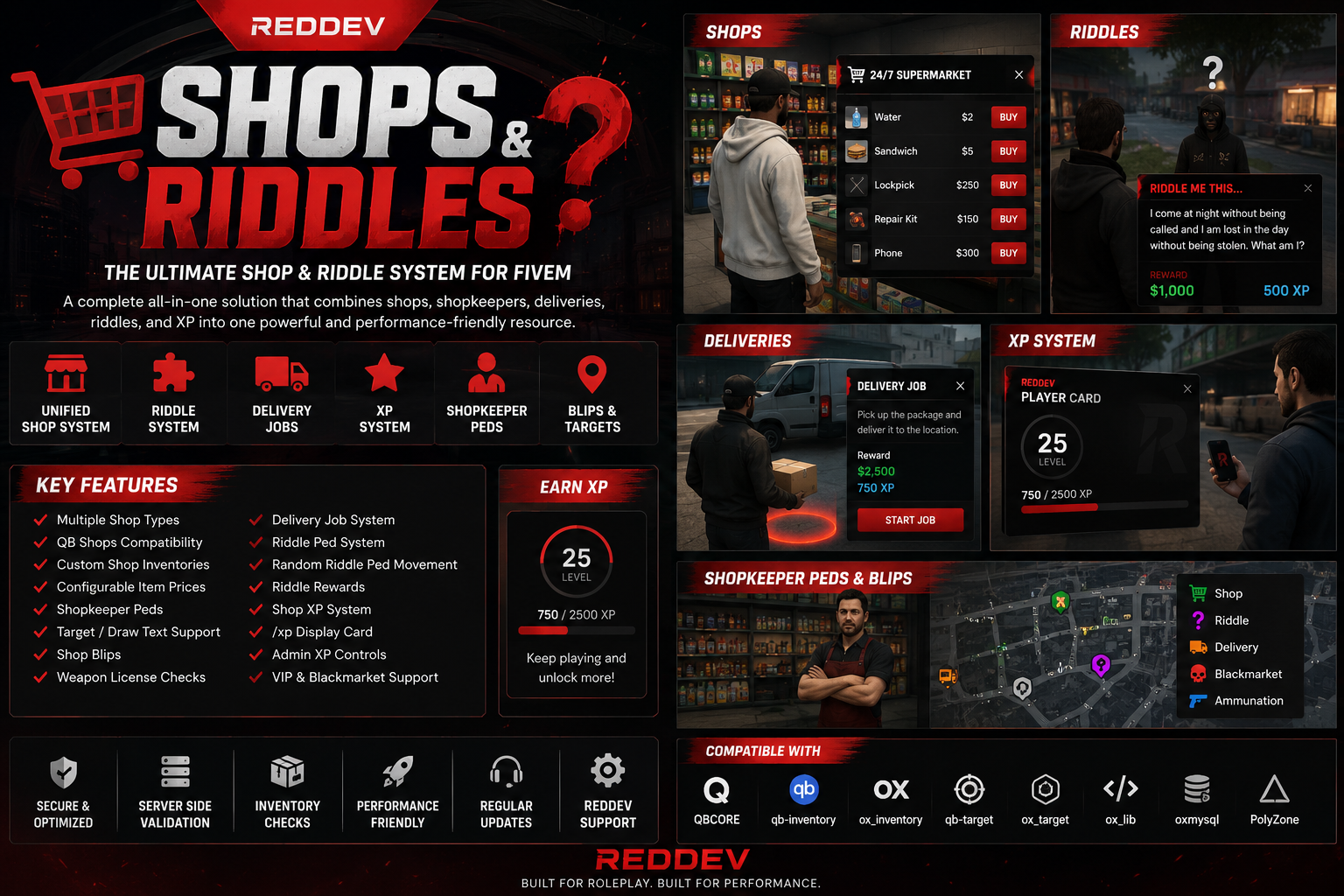
`reddev-shops` is a unified QBCore shop system that merges regular shops, migrated QB shop locations, delivery/restock gameplay, riddle peds, XP-gated purchases, admin XP controls, target interactions, peds, blips, and one consistent NUI shop menu into a single resource.
Only run `reddev-shops`. Do not run old separate shop, riddle, delivery, or qb-shops resources beside it, because duplicate resources can create duplicate peds, target prompts, menus, blips, and purchase events.
## Features
* One unified shop UI for configured REDDEV shops and migrated QB shops.
* Category layout, item cards, cart, checkout, search, close/back behavior, and notifications handled through one menu.
* Server-side purchase validation before payment is removed.
* Supports cash, bank, cash/bank, marked bills/black money, and optional VIP coin payment methods.
* Supports `ox_inventory`, `qb-inventory`, and common QB-style inventory resource auto-detection.
* Supports `qb-target` and `ox_target` auto-detection.
* E-key drawtext fallback for shop and riddle peds.
* Shop peds, target zones, markers, and blips.
* Job, gang, item, license, and explicit user-license restrictions.
* Weapon metadata support, including server-generated serial/registration values.
* XP-gated items through REDDEV shop XP.
* Configurable option to disable shop XP gates entirely.
* Player `/xp` display with configurable position, duration, and optional persistent watermark.
* Admin tab inside the shop menu for setting, adding, or removing shop XP.
* `/setxp` admin command with permission checks.
* Migrated QB shops and delivery/restock job support.
* Riddle adventure module with peds, blips, answers, rewards, and REDDEV shop XP reward.
* Optional random riddle ped movement with synchronized map spots and a configurable arrival watermark.
* Low-end startup batching for shop peds, target zones, blips, riddles, and delivery setup.
* Plain-text customer docs included inside the resource.
## Dependencies
Start these before `reddev-shops`:
```cfg
ensure oxmysql
ensure ox_lib
ensure qb-core
ensure PolyZone
ensure qb-target
ensure qb-inventory
ensure reddev-shops
```
`ox_target` and `ox_inventory` are also supported. The resource auto-detects them when they are started.
## Installation
1. Place the folder in your resources directory as `reddev-shops`.
2. Add `ensure reddev-shops` to `server.cfg`.
3. Do not ensure old separate shop, riddle, delivery, or qb-shops resources.
4. Start the dependencies before `reddev-shops`.
5. Restart the resource:
```
refresh
restart reddev-shops
```
## Server.cfg Ensure Order
Recommended QBCore order:
```cfg
ensure oxmysql
ensure ox_lib
ensure qb-core
ensure PolyZone
ensure qb-target
ensure qb-inventory
ensure reddev-shops
```
Use `ox_target` or `ox_inventory` in place of `qb-target`/`qb-inventory` if those are the active server systems.
## Customer Files Included
Inside the resource:
* `README.txt`: first-stop customer readme.
* `CUSTOMER_SETUP_CHECKLIST.txt`: quick install and testing checklist.
* `HOW_TO_USE.txt`: full setup, player, staff, admin, exports, and troubleshooting guide.
* `config.lua`: main shops, shopkeeper peds, admin permissions, UI behavior, inventory/target detection, payment item, XP command/display, and XP shop toggle.
* `compat/qb-shops-config.lua`: migrated QB shops, store stock, delivery job settings.
* `modules/riddles/config.lua`: riddle peds, blips, answers, start price, rewards, and XP reward.
* `web/`: NUI shop menu and admin overlay.
* `ITEM_COMPATIBILITY_REPORT.txt`: active-server item/image audit for hidden missing items and copied image aliases.
## Configuration
### Main Config
File:
```
config.lua
```
Controls:
* Framework detection.
* Target detection.
* Inventory detection.
* Drawtext fallback.
* Notification adapter.
* Admin permissions.
* XP command.
* XP display and optional XP watermark.
* XP shop requirement toggle.
* Database column auto-add.
* Main REDDEV shop locations.
* Shop labels, peds, blips, markers, categories, items, prices, XP requirements, payment methods, and restrictions.
Important interaction settings:
```lua
Config.UseTarget = true
Config.DrawTextFallback = true
Config.DrawTextFallbackWithTarget = true
```
Low-end startup settings:
```lua
Config.Performance.spawnBatchSize = 2
Config.Performance.startupDelay = 1500
Config.Performance.spawnBatchDelay = 100
Config.Performance.modelLoadTimeout = 5000
Config.Performance.lazyPedSpawning = true
Config.Performance.lazyPedSpawnPerScan = 1
Config.Performance.lazyPedScanWait = 1500
Config.Performance.drawTextFarWait = 500
```
Riddle peds have their own low-end settings in `modules/riddles/config.lua`:
```lua
RiddleConfig.Performance.startupDelay = 2500
RiddleConfig.Performance.spawnBatchDelay = 250
RiddleConfig.Performance.lazyPedSpawning = true
RiddleConfig.Performance.lazyPedSpawnPerScan = 1
RiddleConfig.Performance.lazyPedScanWait = 1500
```
Shopkeeper and riddle ped entities lazy-spawn near players by default, so restart creates blips and interaction data first instead of loading every ped model at once. Increase `spawnBatchDelay`, keep `lazyPedSpawnPerScan = 1`, or raise `lazyPedScanWait` if clients still freeze during `restart reddev-shops`.
The full shop NUI is lazy-loaded only when a shop opens. This keeps resource restart lighter because the large menu bundle is not loaded immediately on restart.
Shop XP settings:
```lua
Config.UseXpSystem = true
Config.XpDisplay.enabled = true
Config.XpDisplay.command = "xp"
Config.XpDisplay.useNui = true
Config.XpDisplay.durationSeconds = 6
Config.XpDisplay.persistent = false
Config.XpDisplay.accentColor = "#e41e2f"
```
Set `Config.UseXpSystem = false` when shops should ignore all item `xpNeeded` requirements. When disabled, the menu hides XP locks and the server purchase validator skips XP checks.
The `/xp` display uses a small REDDEV NUI card by default. It can be moved with:
```lua
Config.XpDisplay.position = {
x = 0.035,
y = 0.50,
align = "left",
}
```
Set `Config.XpDisplay.persistent = true` for an always-on XP watermark. Set `Config.XpDisplay.useNui = false` only if you want the old native GTA text fallback.
Advanced shopkeeper peds:
```lua
peds = {
[1] = {
model = "mp_m_shopkeep_01",
scenario = "PROP_HUMAN_STAND_IMPATIENT",
coords = "shop",
optionalClothing = "",
message = "24/7 Supermarket",
},
[2] = {
model = "a_f_m_beach_01",
scenario = "WORLD_HUMAN_STAND_MOBILE",
coords = vec4(863.37, -1137.26, 23.88, 184.23),
optionalClothing = "",
message = "24/7 Supermarket",
},
}
```
Use `peds` when one shop needs specific shopkeeper models, scenarios, clothing, or multiple shopkeepers. `coords = "shop"` uses that shop's normal `coords` list. If `peds` is set and `Config.ShopPedsReplaceLegacy = true`, it replaces the simple `pedModel + coords` spawn for that shop.
Global shopkeeper peds can also be configured riddle-style:
```lua
Config.ShopPeds = {
[1] = {
shop = "food_store1",
model = "mp_m_shopkeep_01",
scenario = "WORLD_HUMAN_STAND_MOBILE",
coords = vec4(24.47, -1346.62, 29.5, 271.66),
optionalClothing = "",
message = "Welcome to 24/7 Supermarket.",
},
}
```
Shopkeeper random movement:
```lua
Config.ShopPedRandomSpawns.enabled = false
Config.ShopPedRandomSpawns.moveEveryMinutes = 20
Config.ShopPedRandomSpawns.arrivalWatermark.text = "Shopkeepers Have Arrived!"
```
Set `Config.ShopPedRandomSpawns.enabled = true` to make shopkeeper peds move like riddle peds. Use `Config.ShopPedRandomSpawns.spots` for shared movement spots or `Config.ShopPedRandomSpawns.perPedSpots["food_store1:1"]` for one specific ped.
### Migrated QB Shop Config
File:
```
compat/qb-shops-config.lua
```
Controls:
* 24/7, LTD Gasoline, liquor, hardware, and Ammunation locations.
* Delivery job start point.
* Delivery vehicle, deposit, payout, reward item, and delivery locations.
* Migrated stock file behavior.
### Riddle Config
File:
```
modules/riddles/config.lua
```
Controls:
* Riddle ped locations.
* Riddle ped models.
* Riddle messages and accepted answers.
* Start price and payment method.
* Optional bank fallback for entry fee.
* Riddle rewards.
* REDDEV shop XP reward.
* Riddle blips.
* Drawtext fallback.
* Random riddle spawn spots and move timer.
* Arrival watermark text, duration, position, scale, and color.
Current default riddle start fee:
```lua
RiddleConfig.PriceMethod = "cash"
RiddleConfig.Price = 50
```
Random riddle movement:
```lua
RiddleConfig.RandomSpawns.enabled = true
RiddleConfig.RandomSpawns.moveEveryMinutes = 20
RiddleConfig.RandomSpawns.avoidDuplicateSpots = true
```
Arrival watermark:
```lua
RiddleConfig.RandomSpawns.arrivalWatermark.enabled = true
RiddleConfig.RandomSpawns.arrivalWatermark.text = "Riddles Have Arrived!"
RiddleConfig.RandomSpawns.arrivalWatermark.useNotification = true
RiddleConfig.RandomSpawns.arrivalWatermark.screenText = false
RiddleConfig.RandomSpawns.arrivalWatermark.durationSeconds = 20
```
## Database
REDDEV shop XP is stored in the player table column:
```
reddev_shops_xp
```
The resource has:
```lua
Config.AutoAddDatabaseTables = true
```
On first start, the resource checks the player table and adds `reddev_shops_xp` if it is missing.
Manual SQL fallback:
```sql
ALTER TABLE players ADD COLUMN reddev_shops_xp INT NOT NULL DEFAULT 0;
```
For ESX-style `users` tables, add the same column to `users`.
## Admin Access
Admin tools are controlled in `config.lua`:
```lua
Config.AdminControl = {
enabled = true,
permissions = { "god", "admin" },
acePermission = "reddev-shops.admin",
acePermissions = { "reddev-shops.admin", "command", "command.setxp", "admin", "god" },
identifiers = {},
citizenIds = {},
allowConsole = true,
}
```
Admins can be allowed by:
* QBCore/ESX permission group `god`.
* QBCore/ESX permission group `admin`.
* ACE permission `reddev-shops.admin`.
* Common txAdmin/FiveM ACE permissions listed in `acePermissions`.
* License, Discord, or Steam identifier in `Config.AdminControl.identifiers`.
* QBCore citizenid in `Config.AdminControl.citizenIds`.
Recommended ACE line:
```cfg
add_ace group.admin reddev-shops.admin allow
```
## Admin Menu
Admins see an `Admin` button inside the shop menu header.
The admin panel can:
* Set a player's shop XP.
* Add shop XP.
* Remove shop XP.
* Refresh the admin player's displayed XP.
The admin panel only works for online player IDs. Every action is checked again on the server before XP changes are applied.
If `Config.UseXpSystem = false`, XP admin changes are blocked because XP shop requirements are disabled.
## Admin Command
In-game:
```
/setxp
```
Server console or txAdmin console:
```
setxp
```
The command is permission locked for players. Console access is controlled by `Config.AdminControl.allowConsole`.
## Player Shop Flow
Players can open shops by:
* Walking to a shop ped and pressing `E`.
* Using `qb-target` or `ox_target` on a shop ped.
* Running `/xp` to briefly show their current shop XP, if enabled.
Buy flow:
1. Open the shop.
2. Pick a category.
3. Search or browse items.
4. Add items to the cart.
5. Confirm checkout.
6. Server validates the purchase.
7. Server removes money.
8. Server adds items.
The server checks:
* Shop validity.
* Item validity.
* Correct configured price.
* XP requirements, unless `Config.UseXpSystem = false`.
* Money.
* Inventory capacity.
* Required license.
* Job/gang/item/user restrictions.
* Weapon metadata.
* Stock, where stock is configured.
Money is only removed after validation. Items are only added after payment succeeds.
## Payment Methods
Supported configured payment methods include:
* `cash`
* `bank`
* `cashandbank`
* `blackmoney`
* `vipcoins`
Black money item:
```lua
Config.BlackMoneyItem = "markedbills"
```
Optional VIP coin support expects a `reddev-vipshop` resource if `vipcoins` is used.
## Inventory Support
Auto-detection:
```lua
Config.InventorySystem = DetectStartedResource({
"ox_inventory",
"qb-inventory",
"lj-inventory",
"ps-inventory",
"qs-inventory",
"origen_inventory",
"codem-inventory",
"core_inventory",
}, "qb-inventory")
```
Supported directly or through QB framework fallbacks:
* `ox_inventory`
* `qb-inventory`
* `lj-inventory`
* `ps-inventory`
* `qs-inventory`
* `origen_inventory`
* `codem-inventory`
* `core_inventory`
QB-style inventories validate sellable items against `qb-core/shared/items.lua`. Missing configured items are hidden from the live menu when:
```lua
Config.HideMissingItems = true
```
Purchases still re-check item existence server-side, so edited or stale carts cannot buy invalid items.
Inventory item images come from the active inventory image folder:
```lua
Config.InventoryImageDirectories = {
["qb-inventory"] = "qb-inventory/html/images",
["ox_inventory"] = "ox_inventory/web/images",
}
```
If an inventory stores images in a custom folder, set:
```lua
Config.InventoryImageOverride = "your-inventory/html/images"
```
If an image is missing, the UI uses:
```lua
Config.InventoryImageFallback = "./images/reddev.png"
```
Use `ITEM_COMPATIBILITY_REPORT.txt` inside the resource to see which configured items were hidden and which image aliases were copied for the active server setup.
## Target Support
Auto-detection:
```lua
Config.TargetSystem = GetResourceState("ox_target") == "started" and "ox_target" or "qb-target"
```
Supported:
* `qb-target`
* `ox_target`
* E-key drawtext fallback
## Blips
Main shop blips are configured in `config.lua` inside each shop's `blipSettings`.
Hide a normal shop blip:
```lua
blipSettings = { id = 52, color = 2, scale = 0.0 }
```
Riddle blips are configured in:
```
modules/riddles/config.lua
```
Delivery blips are configured in:
```
compat/qb-shops-config.lua
```
## Riddle Adventure
Default static riddle coordinates:
* Riddle Start: `869.47, -1145.98, 24.20`
* Riddle 2: `863.37, -1137.26, 23.88`
* Riddle 3: `868.01, -1137.68, 23.91`
* Riddle 4: `859.79, -1138.16, 23.94`
Random riddle movement is enabled by default. The server chooses synchronized map spots from `RiddleConfig.RandomSpawns.spots`, then moves the peds again after `RiddleConfig.RandomSpawns.moveEveryMinutes`.
When riddle peds arrive or move, players see the configurable watermark:
```lua
RiddleConfig.RandomSpawns.arrivalWatermark.text = "Riddles Have Arrived!"
RiddleConfig.RandomSpawns.arrivalWatermark.durationSeconds = 20
```
Player flow:
1. Watch for the riddle blip or arrival watermark.
2. Talk to the first riddle ped.
3. Pay the start fee if enabled.
4. Read the riddle.
5. Go to the next riddle ped.
6. Enter the answer for the previous riddle.
7. Complete the final riddle.
8. Receive configured rewards and REDDEV shop XP.
Do not publish riddle answers in player-facing docs.
## Delivery Job
Delivery/restock settings are in:
```
compat/qb-shops-config.lua
```
Default GO Postal start:
```
69.09, 127.68, 79.21
```
Player flow:
1. Talk to the GO Postal ped.
2. Pay the truck deposit.
3. Receive the delivery vehicle.
4. Follow delivery route markers.
5. Carry packages from the vehicle.
6. Drop packages at delivery zones.
7. Return the truck.
8. Receive payout/reward.
## Exports
```lua
exports["reddev-shops"]:getPlayerXp(source)
exports["reddev-shops"]:setPlayerXp(source, amount)
exports["reddev-shops"]:addPlayerXp(source, amount)
exports["reddev-shops"]:removePlayerXp(source, amount)
exports["reddev-shops"]:givePlayerItems(source, items, reason)
exports["reddev-shops"]:chargePlayer(source, paymentMethod, amount)
exports["reddev-shops"]:openQbShop(source, qbShopName)
```
Example:
```lua
exports["reddev-shops"]:addPlayerXp(source, 250)
```
## Events and Callbacks
Customer-facing entry points:
* Client event: `reddev-shops:openShop`
* Server callback: `reddev-shops:getPlayerXp`
* Server callback: `reddev-shops:finishPurchase`
* Server callback: `reddev-shops:isAdmin`
* Server callback: `reddev-shops:adminSetXp`
Riddle callbacks:
* `reddev-shops:riddles:startAdventure`
* `reddev-shops:riddles:submitAnswer`
* `reddev-shops:riddles:getOutfit`
* `reddev-shops:riddles:getSpawnLocations`
Riddle client event:
* `reddev-shops:riddles:updateSpawnLocations`
## Required Test Checklist
Before going live, test:
* Resource starts with no server console errors.
* Database column exists or is created.
* Store peds spawn.
* Riddle-style shopkeeper `peds` entries spawn.
* Shopkeeper `optionalClothing` applies when configured with a supported freemode ped model/citizenid.
* Shopkeeper random movement and arrival watermark work if `Config.ShopPedRandomSpawns.enabled = true`.
* Riddle peds spawn.
* Riddle peds move to configured random spots after the configured timer.
* The `Riddles Have Arrived!` watermark appears for the configured duration.
* Delivery ped spawns.
* Shop blips show.
* Riddle blips show.
* Delivery blip shows.
* `qb-target` or `ox_target` prompts work.
* E-key fallback opens shops.
* Admin button appears for admins.
* Admin XP set/add/remove works.
* `/xp` shows the player's shop XP when `Config.XpDisplay.enabled = true`.
* The XP watermark stays on screen when `Config.XpDisplay.persistent = true`.
* XP-locked items block correctly when `Config.UseXpSystem = true`.
* XP-locked items can be bought without XP when `Config.UseXpSystem = false`.
* Normal item purchase works.
* Ammo purchase works.
* Weapon purchase works.
* Weapon metadata/serial is created.
* License-required weapons are blocked without license.
* Job/gang restricted shops/items are blocked correctly.
* Not enough money blocks purchase.
* Full inventory blocks purchase before money is removed.
* Riddle start works.
* Riddle answer flow works.
* Riddle final rewards work.
* Delivery job starts, progresses, and pays.
## Troubleshooting
### Admin Button Missing
* Confirm the player is `god` or `admin`.
* Add `add_ace group.admin reddev-shops.admin allow` to `server.cfg`.
* Add the player's citizenid to `Config.AdminControl.citizenIds`.
* Add the player's license/discord/steam identifier to `Config.AdminControl.identifiers`.
* Restart `reddev-shops`.
### No Target Prompt
* Confirm `qb-target` or `ox_target` is started.
* Confirm `Config.UseTarget = true`.
* Keep drawtext fallback enabled.
### No E Prompt
Check:
```lua
Config.DrawTextFallback = true
Config.DrawTextFallbackWithTarget = true
RiddleConfig.DrawTextFallback = true
RiddleConfig.DrawTextFallbackWithTarget = true
```
### Purchase Fails
Check:
* Player money.
* Payment method.
* Inventory space.
* Item exists in `qb-core/shared/items.lua`.
* Required license.
* Job/gang/item restrictions.
* Shop stock.
### Weapon Purchase Fails
Check:
* Weapon item exists in shared items.
* Required license is present.
* Inventory can carry the weapon.
* No other inventory script is blocking metadata.
### Riddle Says Not Enough Money
* Confirm `RiddleConfig.Price`.
* Confirm `RiddleConfig.PriceMethod`.
* Use `RiddleConfig.AllowBankFallback = true` if cash display/payment is inconsistent.
* If the server uses cash as an inventory item, confirm `Config.CashItemName = "cash"` in `reddev-shops/config.lua`.
### Riddle Peds Should Stay Static
Set:
```lua
RiddleConfig.RandomSpawns.enabled = false
```
The peds will then use the static `coords` inside each `RiddleConfig.Riddles` entry.
### Riddle Arrival Watermark Missing
Check:
```lua
RiddleConfig.RandomSpawns.enabled = true
RiddleConfig.RandomSpawns.arrivalWatermark.enabled = true
RiddleConfig.RandomSpawns.arrivalWatermark.durationSeconds = 20
```
### XP Not Saving
* Confirm `oxmysql` starts before `reddev-shops`.
* Confirm `reddev_shops_xp` exists in the player table.
* Keep `Config.AutoAddDatabaseTables = true` for automatic setup.
### Duplicate Peds or Prompts
* Stop old shop/riddle/qb-shops resources.
* Only run `reddev-shops`.
* Restart the server or resource.
## Support Information to Collect
When asking for support, include:
* txAdmin/server console error.
* F8 client console error.
* Screenshot of the issue.
* Inventory resource.
* Target resource.
* Shop ID or riddle number.
* Item name.
* Steps to reproduce.
---
# Agent Instructions
This documentation is published with GitBook. GitBook is the documentation platform designed so that both humans and AI agents can read, navigate, and reason over technical content effectively. Learn more at gitbook.com.
## Querying This Documentation
If you need additional information that is not directly available in this page, you can query the documentation by asking a question.
Perform an HTTP GET request on the following URL with the `ask` and `goal` query parameters:
```
GET https://reddev-development.gitbook.io/reddev-development-docs/reddev_devtablet/reddev_shops.md?ask=&goal=
```
`ask` is the immediate question: it should be specific, self-contained, and written in natural language.
`goal` is what the user is ultimately trying to achieve, the reason they need the answer. Sharing it helps GitBook give you a better, more relevant answer. A goal is most helpful when it describes the outcome the user wants rather than restating the question. For example, with `ask=how do I create an API token`, a goal like `automate deployments from our CI pipeline` lets GitBook tailor the answer to that use case.
The response will contain a direct answer to the question and relevant excerpts and sources from the documentation.
Use this mechanism when the answer is not explicitly present in the current page, you need clarification or additional context, or you want to retrieve related documentation sections.